


Little Panda: Princess Makeup
4.0669.00 Reviews
App Specs
- Version
- 8.76.00.00
- Updated On
- License
- Free
- Downloads
- 100,000,000+
- Developer
- BabyBus
- Categories
- Educational
- Platform
- Android, iOS
Screenshots
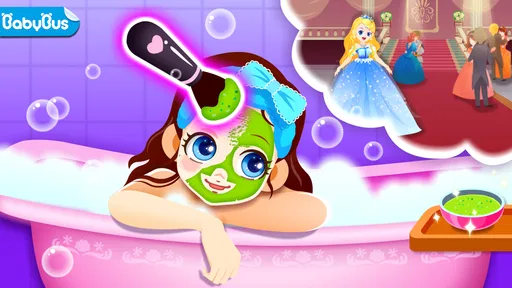
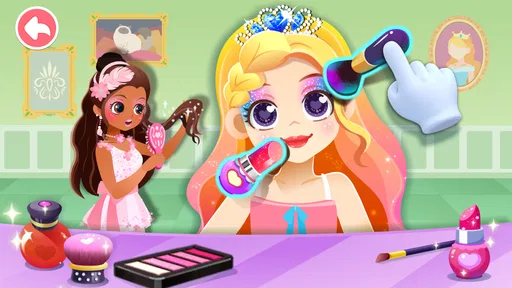
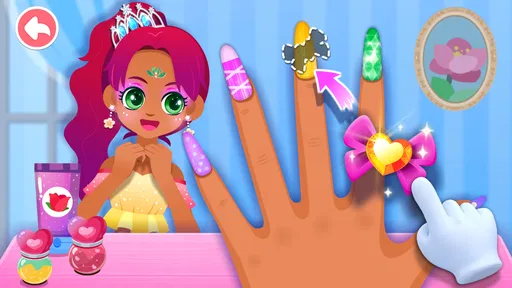
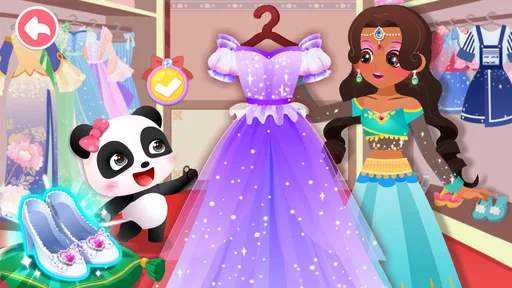
 Analysis by AppCompare
I can see this working best as a short, shared-device activity: a child takes a turn choosing a princess and trying out a look, then hands the phone or tablet to a sibling or adult to see the result. That simple show-and-tell moment suits a dress-up game better than expecting it to occupy a child for a long stretch. I’d treat it as a creative play option to dip into, not as a substitute for drawing, pretend play, or time spent together.
In that kind of household use, a little coordination helps. Agree on whose turn it is and whether the finished look should be changed or left for the next person; that avoids the familiar shared-tablet argument over who gets to make the final choice. I also like the idea of an adult sitting nearby at first, not to direct every color choice, but to see how the child navigates the game and whether its pace and presentation suit them.
Setting expectations on a shared device
Before handing over a family device, I’d check the game’s current setup and the device’s own settings rather than assume that a child-specific boundary is built into the game. A shared tablet may contain other apps, accounts, or purchases, so it is sensible to keep an eye on what is available and to make sure a young child knows to ask before tapping anything unfamiliar. That is practical housekeeping, not a reason to make the activity feel complicated.
The game is free to install, while optional in-app purchases range from $0.49 to $3.99 per item. I’d explain that distinction in simple terms before play: downloading it does not mean every possible item is automatically included. If a child is using an adult’s device, the adult should handle purchase decisions and check the device’s purchase settings. That small conversation can prevent a colorful button from turning into an unexpected household expense.
Because several children might use the same screen, I’d also set a turn length that feels fair without promising a particular amount of content or progress. A useful routine is to let each child finish one look, show it, then pass the device along. It makes the game easier to share and gives siblings a natural prompt to talk about why they chose certain colors or accessories instead of competing over who can tap fastest.
Choosing the right kind of play
This is a better fit for children who enjoy princess characters, visual choices, and pretend styling than for kids who want rules, score-chasing, or a clear challenge to beat. It is also not the right pick if you want a structured lesson in makeup technique or a broad creative studio with many unrelated activities. The appeal is narrower: make a character’s appearance your own and use that choice as a starting point for imaginative play.
Compared with a coloring app, the fun here is less about filling a page and more about assembling a look from different kinds of choices. Compared with open-ended drawing, it offers a more guided character-based canvas, which can help a child who likes having a subject to work on but may feel limiting to someone who wants to create anything from scratch. For a young player who loses interest once the character is styled, a craft activity or a drawing app may hold attention longer.
Worth Reading Before You Choose

Flipboard Shows What News Apps Must Do Beyond the Feed

Switching to Android Auto Means Rethinking Your Driving Routine

Google Calendar Makes a Crowded Week Easier to Manage

Ludo King Makes the Most of the Minutes Between Plans

Baby Panda World Brings Quick Play to Modern Phones, but Its Game Library Feels Busy

ESPN’s Live Game View Makes Following Close Games Easier
A practical way to extend a session without turning it into a lesson is to invite the child to give the princess a reason for the look: Is she going to a celebration, meeting a friend, or visiting somewhere special? The game’s party premise gives that kind of conversation an easy starting point, but the story can come from the child. I find this works especially well when an adult joins for a few minutes and asks open questions rather than prescribing which colors or accessories “match.”
What I would check before relying on it
When a child asks whether the game can be used independently, I’d first watch one brief session together. That lets you see whether the controls make sense to that particular child, whether they need help choosing what to do next, and whether the device remains in a comfortable shared-use setting. Interface ease is personal: a game that feels obvious to one child may still need a little explanation for another.
I would also avoid treating the educational angle as a guarantee of formal learning. Choosing colors, noticing combinations, and moving through visual options can prompt practice with decision-making and coordination, but the value depends on how the child plays. If your goal is a specific skill or a guided activity, an adult-led craft or a learning app built around that subject is a more direct choice. Here, the strongest educational payoff is likely to come from conversation and imaginative choices around the makeover.
There are a few sensible trade-offs to keep in mind. A character makeover is visually engaging, but it can encourage children to focus on appearance, so I’d balance it with play that celebrates other interests and abilities. The game’s princess theme will also be a genuine draw for some children and a reason others pass. I would not try to sell it to a child who has no interest in dress-up; a different creative game is more likely to feel welcoming.
For a household deciding whether to install it, the simplest test is to consider how the child already likes to play. If they enjoy choosing outfits, inventing stories, and showing a finished creation to someone else, this has a clear place in a rotation of short activities. If they prefer puzzles, construction, or games with goals and feedback, I would look elsewhere rather than expect a makeover activity to become something it is not.
If you're looking for an app that will keep your little ones entertained while also unleashing their creativity, look no further than Little Panda: Princess Makeup. This delightful app is a whimsical playground for kids, combining fun makeup activities with enchanting storytelling. Let's dive into what makes this app a standout choice for parents and kids alike.
Whimsical World of Princess Makeup
As soon as you open Little Panda: Princess Makeup, you're transported into a magical world where creativity knows no bounds. The app is designed with vibrant colors and charming animations that capture the attention of young users instantly. It's like stepping into a fairytale where every child can become a makeup artist for their very own princess.
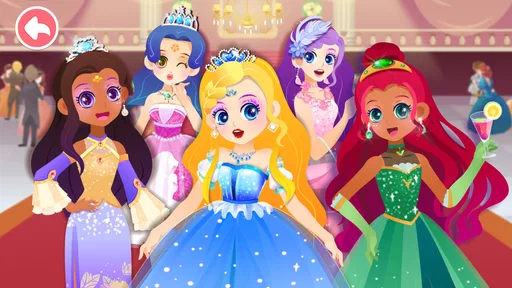
The main interface is incredibly intuitive, making it easy for children to navigate on their own. They can select from a variety of princess characters and start their makeover journey. Each character has a unique story, adding an extra layer of engagement as kids get to know their princess while working on their makeup skills.
Endless Creative Possibilities
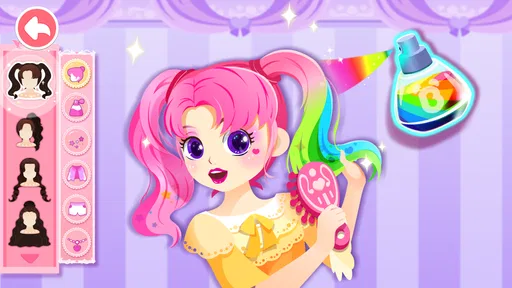
One of the most exciting aspects of this app is the sheer variety of makeup tools and options available. Kids can choose from an array of lipsticks, eyeshadows, blushes, and more. They can mix and match colors to their heart's content, creating endless combinations. It's like having a virtual makeup kit at their fingertips!
The app also includes fun accessories such as tiaras and earrings, allowing children to complete their princess look. The customization options are vast, ensuring that no two makeovers are ever the same. It's a fantastic way for kids to express themselves and experiment with different styles.
Learning Through Play
While Little Panda: Princess Makeup is undeniably fun, it also offers educational benefits. Kids learn about colors, patterns, and design principles as they play. The app encourages creativity and decision-making, helping children develop fine motor skills and hand-eye coordination. It's a blend of entertainment and education that parents can feel good about.
Moreover, the app promotes storytelling and imaginative play. As children interact with the princesses, they can create their own stories about royal adventures and magical lands. It's an excellent way to foster creativity and narrative skills in young minds.
Parental Controls and Safety
For parents, safety is always a top priority when it comes to selecting apps for their children. Fortunately, Little Panda: Princess Makeup offers robust parental controls to ensure a safe play environment. Parents can set limits on screen time and monitor their child's progress, providing peace of mind.
The app also features an ad-free experience, so kids can focus on their creative journey without interruptions. It's a thoughtful touch that enhances the overall user experience and shows that the developers have considered the needs of both children and parents.
Conclusion: A Magical Experience
In a world full of apps vying for children's attention, Little Panda: Princess Makeup stands out as a delightful and engaging option. It's a magical experience that combines creativity, storytelling, and education in one convenient package. Whether your child is a budding artist or just loves princesses, this app is sure to be a hit in your household.
So, why wait? Dive into this enchanting world and let your child’s imagination soar with Little Panda: Princess Makeup. It's more than just an app; it's a gateway to a world of creativity and fun.
How it fits into a family’s app rotation
For context, this is an educational game from BabyBus, a developer known here through the game’s child-focused presentation. It has an Everyone age rating, and its broad appeal is reflected in more than 100 million installs. Those figures can help a parent understand that it is widely used, but they do not replace checking whether the theme and interaction style suit a particular child. I’d make that judgment based on the child’s interests and how they respond during a first play session.
Its audience is quite specific, which is a strength when the theme clicks and a limitation when it does not. A child drawn to princesses and styling can make choices immediately, while a child who would rather build, solve, or explore may have little reason to return after a first look. I would not install it simply because it is labeled educational; the better question is whether imaginative character play is already something the child enjoys.
For a caregiver, the rating is a useful starting point rather than a promise that every household will want the same content on a shared screen. I’d still consider the child’s age, temperament, and current interests, and stay close enough to notice if the makeup theme prompts questions about appearance. A relaxed conversation can keep the focus on creativity, color, and pretend scenarios rather than suggesting there is one “right” way for a character to look.
Practical details before the first session
The game is free, and the current version is 8.75.13.00. It requires Android 6.0 or later, so an older device may not be able to run it. The average rating is 3.8 from around 161,000 ratings, with 666 written reviews. I’d treat the rating as a broad signal, not a verdict: for a child who likes makeover play, the core idea may be a good match, while a child looking for a different kind of challenge may rate the same experience poorly.
If you are weighing the purchase options, I’d keep the first session simple and avoid discussing every item as though it needs to be unlocked. Let the child explore what is available, and decide together whether any optional purchase is worth considering. Since purchases are priced per item, a clear adult-led boundary is more useful than letting a child infer that every appealing choice should be bought.
One other useful household habit is to separate the child’s play choice from the adult’s account decisions. Let the child choose the colors and accessories, while the device owner handles settings and any spending. That division gives a young player room to make creative decisions without handing over responsibility for account-level actions. It also works well when a tablet belongs to more than one person, because the adult can keep the shared device’s rules consistent across games.
A measured household verdict
Little Panda: Princess Makeup is easiest to recommend as a brief, supervised or nearby activity for a child who already enjoys styling characters. It can give siblings something concrete to compare and a parent an easy opening for a story prompt, while its focused theme makes it less suitable as an all-purpose creative app. The most helpful approach is to use it in short turns, keep purchase choices with an adult, and balance screen play with other kinds of making and pretending.
BabyBus’s game has been available since July 24, 2019, and its appeal remains straightforward: children can play at designing a princess’s look without needing an elaborate setup. I’d choose it for a child who finds joy in colors, accessories, and character stories, but I would skip it for one who wants puzzles, open-ended drawing, or a more structured learning path. With that expectation set, the game can be a pleasant addition to a family’s rotation rather than something expected to suit every child or every occasion.
Pros
- Engaging and colorful graphics.
- Intuitive controls for easy play.
- Frequent updates with new content.
- Stimulates creativity and imagination.
- Safe for young children
- no ads.
Cons
- Limited customization options.
- In-app purchases can be pricey.
- Requires internet for certain features.
- Repetitive gameplay over time.
- Some features locked behind paywall.
FAQs for Little Panda: Princess Makeup
What is Little Panda: Princess Makeup about?
Little Panda: Princess Makeup is a delightful educational game designed for children, focusing on creativity and fashion. Players assist a little panda in choosing outfits, applying makeup, and creating stylish looks. The game promotes imaginative play and helps improve fine motor skills through interactive, child-friendly activities.
Is Little Panda: Princess Makeup safe for children?
Yes, Little Panda: Princess Makeup is specifically designed with children in mind, featuring age-appropriate content and easy-to-use controls. The app is free from harmful content and includes parental controls to ensure a safe and enjoyable experience for young users. Always check for in-app purchase settings to manage expenses.
What platforms is Little Panda: Princess Makeup available on?
Little Panda: Princess Makeup is available for both Android and iOS devices. It can be downloaded from Google Play Store for Android users and the Apple App Store for iOS users, making it accessible for a wide range of devices, including smartphones and tablets.
Does Little Panda: Princess Makeup require an internet connection?
While Little Panda: Princess Makeup can be played offline, certain features like updates and additional content downloads may require an internet connection. Playing offline ensures children can enjoy the game without interruptions, but check for updates when connected to ensure the latest version with all features is installed.
Are there any in-app purchases in Little Panda: Princess Makeup?
Yes, Little Panda: Princess Makeup may include in-app purchases for additional content or features. It’s essential to review these options and adjust settings to prevent unauthorized purchases. The game is generally free to play, but extra content can enhance the gameplay experience for those interested.


